
Home »
Salesforce Backup and Recovery: How a Cancer Prevention Nonprofit Moved from Weekly Exports to Daily Backups
At a Glance
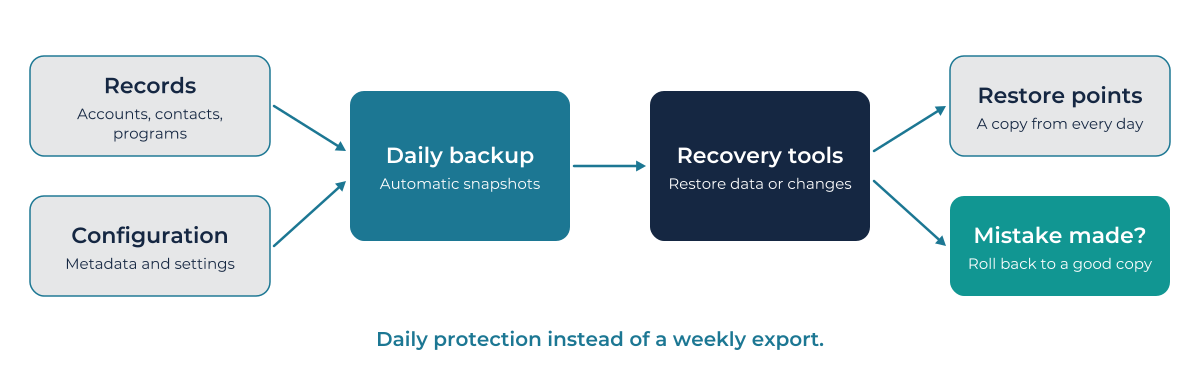
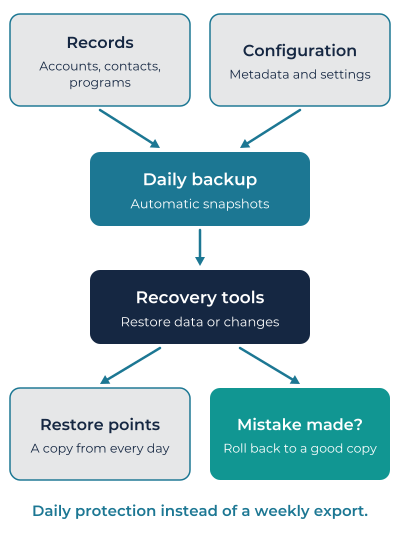
A nonprofit that supports cancer prevention programs had run Salesforce for about two years with no dedicated backup and recovery solution. Its only safety net was Salesforce’s weekly data export. CRMF helped the team evaluate its options, then implemented and configured Own (formerly OwnBackup) for daily backup and recovery. The result: daily protection where only a weekly export existed before, lower exposure to data loss, and a scalable foundation for future data governance.
Background: A Safety Net With a Week-Long Gap
Most teams do not think about backups until the day they need one. A user deletes the wrong records. An import overwrites good data with bad. A configuration change ripples through related records before anyone notices. In that moment, you find out how good your recovery plan really is.
For this nonprofit, the question mattered more than most. The information behind its cancer prevention work lives in Salesforce, and when program data goes missing or gets corrupted, the impact reaches past the database to the people and programs relying on it.
The team had used Salesforce for roughly two years. The platform was doing its job, but the protection around it had not kept pace. They wanted to understand what real Salesforce data protection looks like and needed help choosing and setting up the right tool. Here is how CRMF helped close that gap.
The Challenge: Salesforce Runs the Platform, Protecting Your Data Is Your Job
Salesforce keeps its platform running. Protecting your data from your own users, imports, and changes is a different job, and it falls to you.
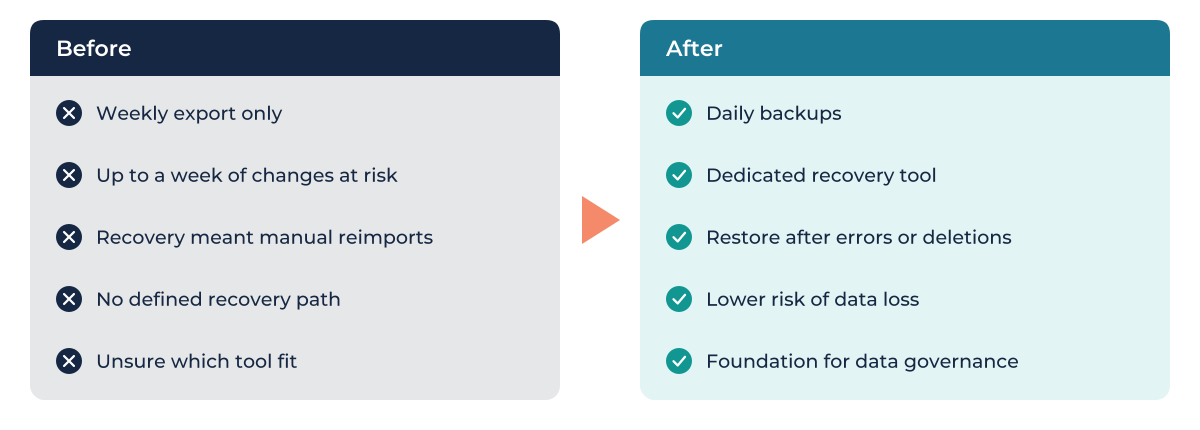
A weekly export is like saving a document once a week: if something goes wrong on day six, you lose almost a week of work. Restoring from export files also means manual reimports, careful mapping, and rebuilding relationships between records, which is slow and error-prone under pressure.
- Accidental deletion or corruption. One mistake or bad data load could damage records with no quick way back.
- Unnoticed changes. Changes to data or configuration left no clear point in time to restore to.
- Hard recovery from user error. Undoing a mistake meant piecing data back together from export files.
- No tested recovery path. The organization had no defined way to recover its Salesforce information.
- Uncertainty about the right tool. The team was not sure which backup solution fit its needs.
- A weekly gap. Up to a week of changes could be at risk at any moment.
The Solution: From Weekly Exports to Daily Backup and Recovery
CRMF helped the nonprofit move from evaluating backup options to running a dedicated Salesforce backup and recovery solution. The approach was straightforward: understand what needed protecting, choose the right tool, and set it up properly the first time.
The difference is practical. Before, recovering from a mistake meant hunting through export files and rebuilding records by hand. Now there is a dedicated tool built for exactly that job.
- Backup strategy evaluation. We reviewed the risks of relying on a weekly export alone.
- Own selection and setup. Own (formerly OwnBackup) was established within the Salesforce environment.
- Daily backup configuration. Core backup capabilities moved the team from weekly snapshots to daily protection.
- Recovery configuration. Core restore capabilities give the team a defined way to recover from user error, unwanted changes, or accidental deletion.
- A foundation to build on. A scalable setup ready for future backup administration and recovery planning.
How the Project Ran
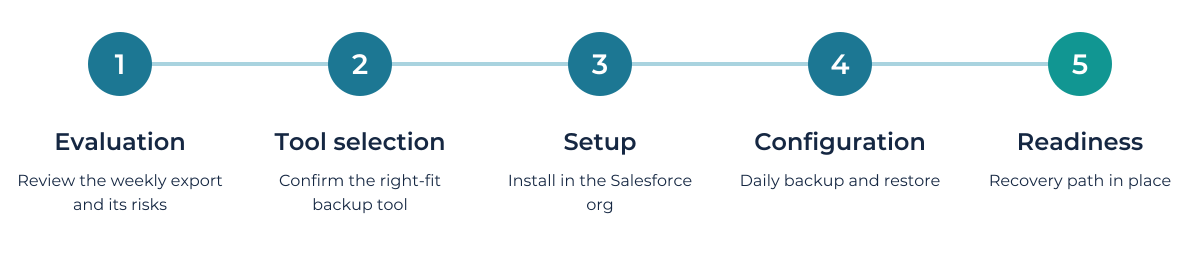
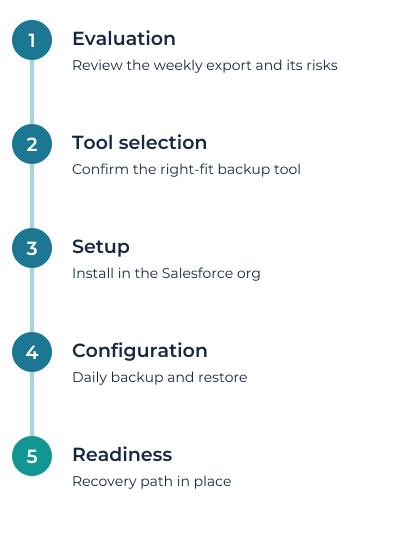
Five phases took the team from evaluation to a configured, ready-to-use backup and recovery setup.
Engagement Snapshot
Client type
Nonprofit supporting cancer prevention programs
Services provided
Backup strategy evaluation, Own setup, daily backup configuration, restore capability configuration
Core platforms
Salesforce, Own (formerly OwnBackup)
Results: A Mistake Becomes a Fixable Problem
The nonprofit now has a dedicated daily Salesforce backup and recovery capability where only a weekly export existed before. Exposure to accidental data loss and unwanted changes is lower, the team can recover records through a purpose-built tool instead of rebuilding them from export files, and there is a scalable foundation for future backup administration and data governance. Before, a deleted batch of records or a faulty import could cost up to a week of changes. Now a mistake is a fixable problem instead of a lasting one.
Questions About This Project
Is the Salesforce weekly data export enough of a backup?
A weekly export is better than nothing, but it can leave up to a week of changes unprotected, and restoring from export files means manual reimports and rebuilding relationships between records.
What does a dedicated backup tool add?
It is built to restore data after user error, bad imports, or accidental deletion, so recovery does not depend on piecing records back together by hand.
How often are backups taken now?
Daily. CRMF configured the core backup capabilities in scope for the engagement, moving the team from weekly snapshots to daily protection.
The Takeaway
Backup is not a box you check once. It is the plan that decides how fast you recover when something goes wrong, and something eventually will. A weekly export can tell you that data existed. A dedicated backup and recovery solution helps you get it back.
This nonprofit made that move before a data loss event forced its hand.
If your organization relies on Salesforce but still depends on weekly exports or has no clear recovery plan, book a consultation with CRMF to talk through what a Salesforce backup and recovery strategy could do for your team.
Book a Consultation
